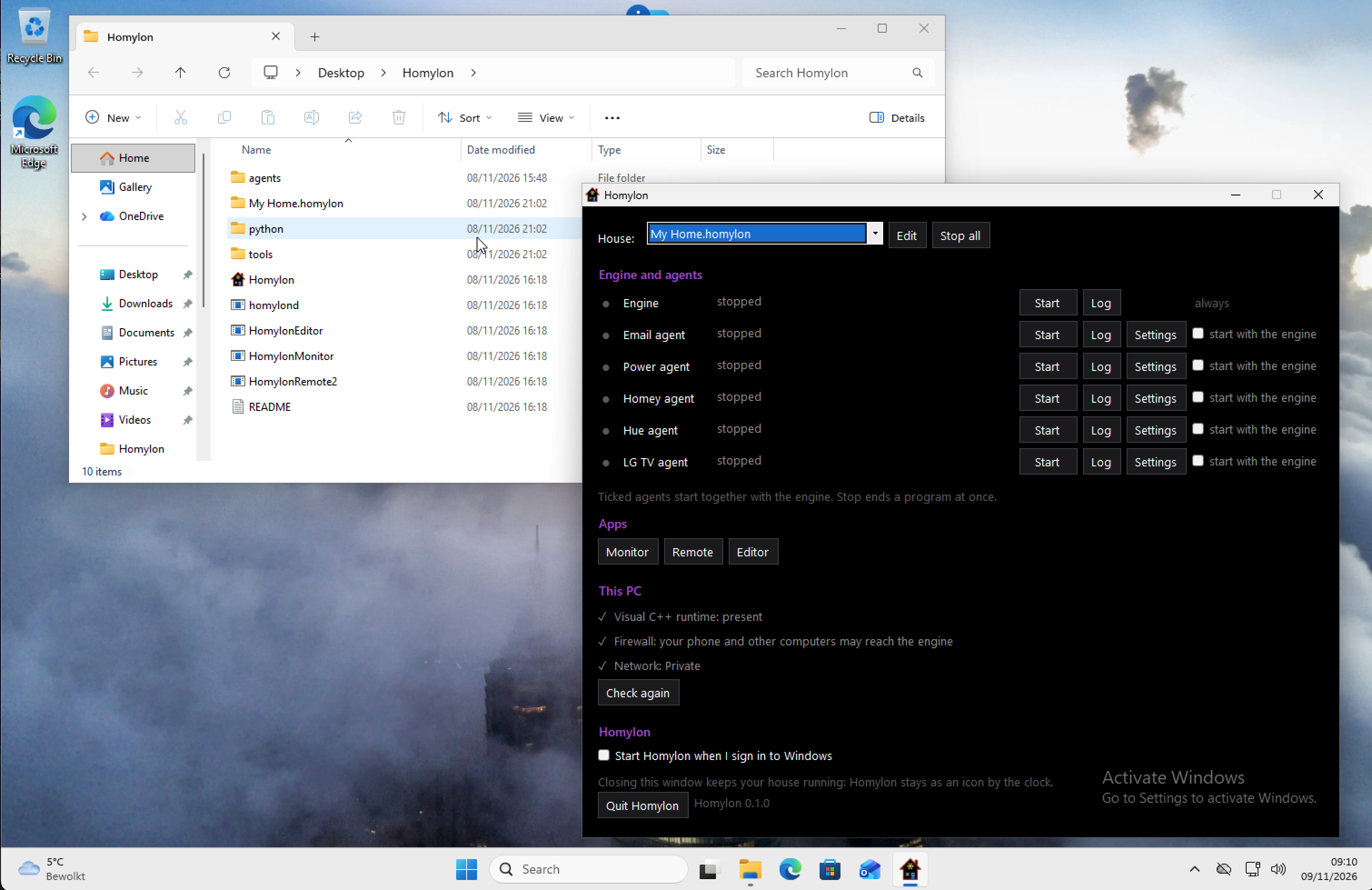
Homylon now runs on Windows! One download gives you the Engine, the apps and five agents. There is nothing to install: unzip it, double-click Homylon and your house is running.
The starter pack is for Windows 10 and 11 (64-bit). It holds a small house to begin with, examples of what you can do, and the Python that some agents use, so you do not need to install that either.
Homylon for Windows (starter pack)
What is in the pack
- Homylon: start here. One window to start and stop the Engine and the agents, and to open the other apps. It waits by the clock while your house runs.
- The Engine: the heart of Homylon. It runs your house from the rules in your scenes.
- Monitor: shows what the Engine does, line by line.
- Remote: your lamps, rooms, machines, events and variables.
- Editor: to write and change your scenes.
- Agents for Philips Hue, Homey Pro, an LG TV, email, and the power use of your house from a P1 dongle on the smart meter.
Do not let the many files in the Hue folder scare you. Some agents are plain Python scripts that you can read in Notepad. Others, like the Hue agent, are written in another language (Swift) and bring the parts they need along as .dll files. You do not have to do anything with them: every agent starts the same way from Homylon.
Good to know: Homylon is software only. It switches and reads your devices, it does not replace them. Without a Hue bridge, a Homey, a TV or other devices on your network there is nothing for it to control. Please read the disclaimer.
How to start
- Download the starter pack. Before you unzip it: right-click the zip, choose Properties, tick Unblock and click OK.
- Right-click the zip and choose Extract All. You get one folder with everything in it. Put it where you keep your own files, for example in Documents.
- Double-click Homylon in that folder. The programs are not signed yet, so the first time Windows may say "Windows protected your PC". Click More info and then Run anyway.
- Look at This PC at the bottom of the window. It checks three things and has a button for each one that is missing: the free Microsoft Visual C++ runtime, a firewall rule so your phone can reach the Engine, and a Private network.
- Click Start on the Engine line. Your house is running.
- For each agent you use: click its Settings, fill them in and close Notepad. Homylon offers to start the agent. Tick start with the engine and from now on it starts together with the Engine.
The Hue agent needs no settings: it finds your Hue bridge by itself. The first time its line turns orange and asks you to press the round button on top of the bridge. Press it and a few seconds later the agent is paired and the line turns green.
Then open the Editor to make the house your own. My Home has a home.scene with examples to start from. After you change a scene, Stop and Start the Engine.
Closing the window does not stop your house: Homylon stays as an icon by the clock. Tick Start Homylon when I sign in to Windows and your house starts by itself every time you sign in.
The README in the pack tells all of this again, and more about each agent.
Remotes on your phone
The Windows Engine works with everything that already talks to Homylon. A good example is the two Android remotes: Lights and blinds for your lamps, rooms and curtains, and the pocket remote with your own buttons. Install them on your phone and give the address of your Windows PC in their settings. See Remotes.
The agents on your other computers, such as MQTT or Matter on a Mac or a Raspberry Pi, find the Windows Engine too.
What comes next
This is the first Windows pack and there is more on the way. Next are Windows versions of the other agents that you already know from the Mac and Linux: CoAP for the CoAP gateway, Matter for Matter devices like curtains and leak sensors, and MQTT for Zigbee and everything else that speaks MQTT. Like the Hue agent they will come as example agents with their own folder in the pack, ready to start from Homylon.
After that: a gentler Stop for the Engine and the agents, and the full colours of the Mac Editor.
Questions or something that does not work? Tell us on the forum.